The Fortnite v22.10 update brings the Octane vehicle from Rocket League for creators to use in their islands, the Block Secondary Action for melee weapons, and the Cobra DMR from Battle Royale. v22.10 also introduces the Rocket League Prop Gallery and Musician Prop Gallery, along with a new island template, plus updates and bug fixes for devices, Prefabs, and Galleries.
Rocket League's Octane Lands in Fortnite
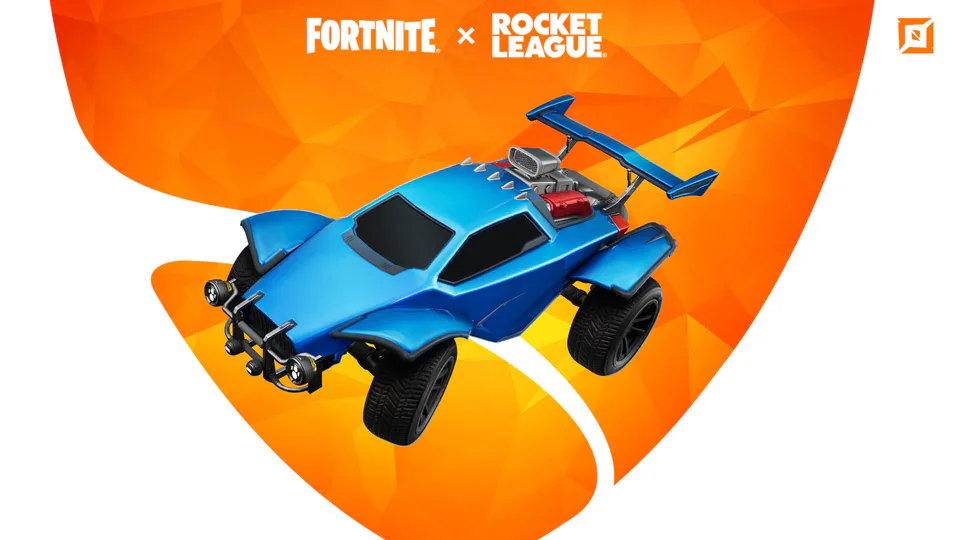
Boost your gameplay with the Rocket League Octane Spawner. This acrobatic Octane vehicle can drive on walls, "Boost" to supersonic speeds, and even fly. Use the Rocket Boost device to recharge Octane's Boost Meter, and the Rocket League Prop Gallery to bring the spirit of competition to any island.
Want to see the Octane's potential on display? Check out Rocket League's Octane Park Tutorial, published by creator team 404 Creative, to perform cool tricks with your friends as you compete for the highest score. Use the island code 7335-2078-5523 to access this island.
Musician Prop Gallery
Added the Musician Prop Gallery, which contains guitars and other instruments.
Melee Designer: "Block" Secondary Action Added
Block debuts in v22.10. You will see Block as a new choice in the Melee Designer's Secondary Action option. You can set Secondary Action to Block Only, Dodge and Block, No Action, or Dodge Only. New Block options help you shape how the Block feature works for your customized weapons.
Battle Royale Item: Cobra DMR
Like a cobra, it is hard to escape the long range of a Cobra DMR. With its fast fire rate, opponents can be defeated swiftly with a steady hand. Find Cobra DMRs from the ground, in Chests, Supply Drops, and from fishing, Loot Sharks, and Reality Sapling Fruit.
Bouncer Gallery
Additional Bouncer devices create a Bouncer Gallery. Choose from the Forest Mushroom or several sizes of tire piles, in addition to the original Bouncer.
Other Updates
Prefab and Gallery Updates
- Added the Bamboo Destructible Gallery, with foliage similar to the Bamboo Gallery but destructible by players.
- Added the Rocket League Prop Gallery: Orange and Blue Scaffolding Banners, Orange and Blue Beach Banners, Orange and Blue Large Hanging Banners, Orange and Blue Small Hanging Banners, LED Arrow Sign, and Octane Statue.
- Added Birthday Cake 4 and Birthday Cake 5 props to the Indoor Residential Prop Gallery.
- Added Hard Squared Columns, Small Pyramid, Small Cone, and Large Planar Cylinder Quarter to the Primitive Shapes Gallery.
- Added additional glass tables to the Modern Furniture Prop Gallery.
Device Updates
The Item Placer device has additional options to control damage to the item and to respawn the item.
Consumables Updates
- Key: usable like keycards to open locked doors.
- Birthday Presents: create a structure that players can open with their Pickaxe; place consumable items inside.
Island Template Updates
In the Octane Park Template island, players can learn how to use the Octane Spawner device to enhance their driving and racing maps. Use island code 7808-4434-5127.
Bug Fixes
Prefab and Gallery Fixes
- Fixed an issue where Bamboo Gallery props were indestructible.
- Fixed incorrect textures in the Autumn Variant Foliage Gallery.
- Restored a missing thumbnail in the Spooky Particle Gallery.
- Restored a missing thumbnail in the Hero/Villain Prop Gallery.
- Fixed geometry clipping in the Colossal Crops Shelter Prefab.
- Fixed a texture on wooden fences in the Colossal Crops Stables Prefab.
- Fixed destructible banner props in the Colossal Coliseum Prefab when Environmental Damage was set to Off.
- Fixed missing textures on the Player Reference device.
- Removed Creative Hub portals that were appearing on creator islands.
Device Fixes
- Fixed a crash when the Horizon Fog Color option in the Skydome device was clicked multiple times.
- Fixed a bug that caused the Explosive device not to reset when destroyed at the end of a minigame.
- Fixed an issue with the Timer device displaying a checkered texture.
- Fixed an issue where several Character Device Controller settings were not working correctly.
- Fixed an issue where Music Blocks were not working for previously-created islands.
- Fixed an issue where the phone tool would disappear when the player respawned.
- Fixed an issue where placing a prop then copy-pasting that prop would delete the original prop.
Island Fixes
- Fixed an issue where players lost the ability to edit when joining in-progress sessions.
- Fixed an issue where lighting in islands was too bright.
- Fixed an issue where published islands without a spawn pad would spawn players above a Barrier placed above an island.
Gameplay Fixes
- Fixed an issue with Mutator Zone devices where players could use a melee weapon's sprint attack while inside the zone, even with the Allow Weapon option set to Off.
- Fixed an issue where the virtual keyboard was not displaying when a player changed values in the Numeric Picker on Xbox Series X|S and Xbox One.
- Fixed an issue where players were getting an Unapplied Changes dialog when leaving the Settings screen.
- Fixed an issue where Storm damage on creator islands was too high.
- Fixed an issue where a widget would appear after a hired guard was eliminated.
- Fixed an issue where the animations for a melee weapon's jump attack could end before the player landed.
- Fixed an issue where interrupting melee weapon attacks by sprinting could break character animations.
- Fixed an issue where chickens could be eliminated by throwing them.