Hey everyone,
The Server Browser in Battlefield 6 is arriving earlier than announced. Originally planned for Phase 3 of Season 5, we are pulling the timeline forward to begin our staged rollout shortly after Phase 2 launches on November 10!
The Rollout Plan
Stability ahead of the holidays is our primary focus. To make sure server loads, queues, and matchmaking backfill run smoothly under live conditions, we are rolling out the Server Browser across two stages:
Limited Public Scale Test: Shortly after Phase 2 launches, a limited group of players will receive access to the Server Browser directly in the live game. This stage allows our teams to stress-test server loads, observe live queue performance, and validate matchmaking backfill with real squads.
Full Global Launch: Once live performance metrics are verified and any necessary fixes are deployed, the Server Browser will fully roll out for all players worldwide.
We are aiming to progress through these stages over the course of a couple weeks. The timeline for this rollout remains dependent on live testing results and any fixes required along the way. We will keep you updated on progress as we evaluate data and prepare for global availability.
Where to Find It
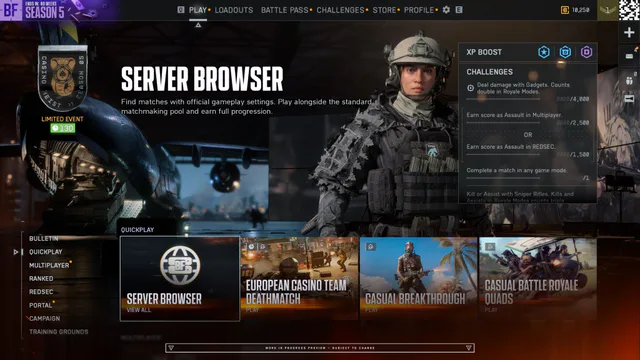
We wanted this core Battlefield feature to be front and center the moment you boot up the game.
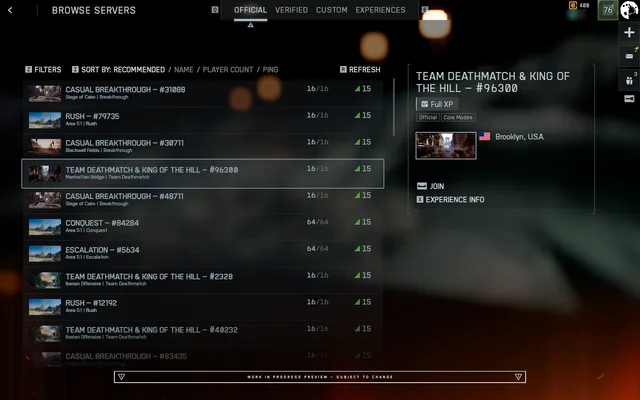
You will find the Server Browser located within the Quickplay row. Selecting it takes you straight to the new Official tab, instantly displaying active servers without any extra navigation. You will also find additional Server Browser tiles across different menus, including Portal.
What’s New: Core Features
Here is a summary of what the Server Browser will deliver on day one:
Direct Access to Official Servers: Browse and join both Official Battlefield Studios servers and Official Player-hosted servers in one unified place.
Shared Server Pool: Quickplay, Multiplayer, Custom Search, and the Server Browser all feed into the same official server pool. Matchmaking actively helps keep browser-listed servers populated.
Granular Filtering & Sorting: Filter by Map or Mode type, or sort server listings by Ping, Player Count, Server Name, or Recommended.
Full Progression & Mastery: Every server in the Official tab awards full XP, weapon mastery, and challenge progression, matching standard matchmaking.
Persistent Lobbies: Stay on the same server across consecutive rounds with your squad rather than going back to the main menu after every match.
Server Classification
To support different community styles while protecting fair progression, servers are organized into three primary browser tabs. Both Official Studios servers and Official Player-hosted servers are listed together under the Official tab:
Browser Tab | Description | Matchmaking Backfill | Progression & XP |
Official (Studios) | Dedicated instances hosted and maintained by Battlefield Studios | Full Matchmaking Integration | Full XP, Mastery Progression |
Official (Player-Hosted) | Persistent servers hosted by players using official game templates | Full Matchmaking Integration (when running active rotation modes) | Full XP, Mastery Progression |
Verified | Community experiences built on verified presets with custom rulesets in Portal | Player & Bot Fill; Direct Browser Join | Full XP Progression |
Custom | Highly modified community sandboxes and custom logic scripts in Portal | Direct Browser Join & Community Invites | Partial XP Progression |
Existing Portal tools, rule modifiers, and admin controls in the Verified and Custom tabs remain completely unchanged.
How Servers Fill
Official Player-hosted servers let you establish a reliable server that you and your squad can return to week after week. These run on a dedicated server, meaning the host does not need to stay in the match for the server to remain online.
Player-hosted servers remain visible in the browser even when empty, allowing you, your friends, or other players to search for and join them at any time. An empty server is not visible to the matchmaking system, meaning automated backfill will not populate an empty server on its own. Once at least one player joins to seed the match, matchmaking can begin routing players in.
A server remains active for up to seven consecutive days without any players before being delisted, and whenever players join, that inactivity timer resets. The server host can also choose to shut down their instance at the end of a round (or when starting a new server), but leaving the game or logging off for the night will never interrupt ongoing matches for other players.
When setting up an official server, matchmaking backfill depends on whether that mode is actively playable on the main Quickplay or Multiplayer menus:
Active Menu Modes: Permanent staples like Conquest or Breakthrough, as well as any featured modes currently available through the Quickplay or Multiplayer menus, receive automated matchmaking backfill once at least one player is inside.
Off-Menu Modes: You can launch or host a server featuring any supported mode at any time, even when that mode isn’t currently listed on the main menus. Matchmaking will not automatically route into these servers, meaning they rely on you, your squad, and your community to discover and populate them directly through the Server Browser. If that mode rotates back onto the active menus later on, your server will automatically begin receiving matchmaking backfill again without needing to be re-hosted.
How You Join Matters
Leading up to now, our teams have been deploying backend matchmaking updates focused on keeping matches full and lobbies healthy. We built this system to improve match flow immediately while laying the groundwork for the Server Browser.
How you enter a server will influence your round-to-round journey:
Joining via the Server Browser: You remain on that specific persistent server through its map rotation for as many rounds as you want, as long as the server remains healthy and active, or if it is a persistent Player-hosted server. Even on single-map or 24/7 servers, you will play straight into the next round without leaving.
Joining via Quickplay or Multiplayer: Standard matchmaking connects you directly into this same pool of official servers. If a server is set to repeat the exact same map and mode continuously (like a 24/7 rotation), players entering through the main menu are automatically re-queued at the end of the round so they aren’t trapped in an unintended single-map loop.
Joining via Custom Search: If your search criteria include multiple modes and maps, matchmaking prioritizes fulfilling your selections. If the current server’s next map does not match your criteria, matchmaking will route you to a new server that fits your filters.
Looking Ahead
Bringing the Server Browser back to Battlefield is all about giving you direct control over how, where, when, and with whom you play. Our primary focus is making sure the core browsing and hosting experience is rock-solid.
We will be tracking server health and listening to your feedback closely as we evaluate any future adjustments. We’ll have further details on exact rollout timing and a full guide on how to use the Server Browser coming to you soon.
For the latest updates, keep an eye on Steam Discussions and our BattlefieldComm X account. If you need to report any issues, please visit EA forums. If you want to take part in Q&As, giveaways, community events, or find a squad, join the Battlefield Discord.
See you on the Battlefield.
//The Battlefield Team
This announcement may change as we listen to community feedback and continue developing and evolving our Live Service & Content. We will always strive to keep our community as informed as possible.