
With FIFA 20's first full weekend wrapped up, it's time to dig into the first big Title Update (TU), live now on PC and coming soon for PlayStation 4 and Xbox One.
For those new to this series of Pitch Notes articles, whenever a TU for FIFA 20 drops, and it contains changes or fixes that we believe the community would benefit from additional context around, we will endeavor to deep dive into those changes so it's clear what is changing.
We won't be covering every single thing in TU2 here, but if you want to review the full list of changes and fixes, you can do so here – Title Update #2 Notes.
With that out of the way, lets jump right in.
GAMEPLAY
- These gameplay updates are driven off the feedback that we've received over the past few weeks, including the feedback from the Closed Beta.
- Most of the upcoming updates have been played by members of the community, with their feedback influencing those updates where appropriate.
- We are being cautious about every change that we are making and we are focused primarily around fixing bugs, not fundamental changes to gameplay. That being said, we also want to ensure that when we have clear and consistent feedback around a topic, we are positioned to respond quickly where appropriate.
With that context in mind, let's look at some of the changes in this Title Update.
GOALKEEPERS
One area of focus for the team in this TU was on goalkeepers, with a number of the change and fixes for them. There are two main improvements that we wanted to cover in this Pitch Notes.
First off, we have a change that is focused on how the keeper was handling shots that result in rebounds. The direct text from the TU notes reads:
- Goalkeepers will be more likely to push the ball further away from the net when they make a save that would result in a rebound.
With this change, combined with the other fixes for goalkeepers, covered in the TU#2 Notes, we are expecting to see less goals from rebounds, with the keeper trying to push the ball away from the net more often instead of seeing the ball directed into a spot where an attacker could easily score a rebound goal from.
Secondly, we have a change that is focused on penalties, and the range by which a keeper will react, and attempt to save the ball, when they are standing in the middle of the net, which is this change in the TU notes:
- In a penalty kick situation we have Increased the range that a goalkeeper will react to the ball, and attempt to make a save, when they are standing still in the middle of the net.
- This will result in goalkeepers being more likely to react and make saves to shots that are placed close to where they are standing when they are standing in the middle of the net.
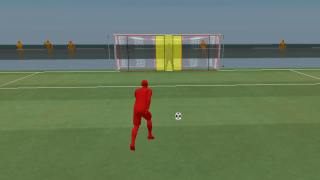
The difference this change will make is easily understood through visuals, so here is a pair of images, before and after TU#2, that show the change.
Before TU#2
Above is a penalty kick from before TU#2. Note the yellow zone surrounding the goalkeeper, it's their potential save range if they stood still at the center of the goal. So if the keeper stood still during this penalty kick with no other inputs, they would only save if the ball if it went into the yellow zone.
After TU#2
The yellow zone has been increased in TU#2. This means that the goalkeeper's reach has been extended when standing still in the middle of the net during a penalty kick.
The updates in this TU are the first wave of changes to goalkeepers, but as we are continuing to focus on this area, you can expect that future Title Updates will contain additional updates to goalkeepers.
DRIBBLING
The dribbling change in this TU is all about making those players with high-end dribbling related Attributes as responsive when they have the ball as possible, with the most benefit to this change coming when changing directions while dribbling the ball. Here is the change from the TU notes:
- Improved the responsiveness of dribbling, when not using any dribbling modifiers or skill moves, for players that have an average rating of 80 or higher between the Attributes of Dribbling, Agility and Balance.
- The effectiveness of this improvement will scale based on the average rating with the least improvement being felt at 80 and the most improvement at 99.
- This will not have an impact on players that do not have an average rating of exactly 80 or higher between the Attributes of Dribbling, Agility and Balance.
So, to review, this means that when you are playing with a player that has an average rating of 80 or higher between those three Attributes (Dribbling/Agility/Balance), you should see those players being more responsive when they have the ball at their feet. As mentioned, this will not have an effect when you are using any dribbling modifiers, such as when Strafe Dribbling or when doing Skill Moves, but will be in effect when just dribbling using the basic Move Player controls, including when the player is sprinting.
For FUT, the Attribute changes from Chemistry will impact this, either with players that normally wouldn't qualify being able to qualify due to Chemistry boosts, or vice-versa, with players not qualifying as a result of the reductions to their Attributes due to poor Chemistry.
The impact of this improvement scales, in an equal and linear manner, based on the average of those three attributes, starting at an average of 80, and running up to an average of 99.
Also important to understand, there is no 'rounding up' present in this formula, so if the average of the Attributes in question was 79.97, it would not be rounded up to 80.
The best way to really understand this change is actually through feel when playing the game, as you should notice the difference when you are in control of players that are impacted by this versus controlling players that are not.
CONTAIN/SECONDARY CONTAIN
Inline with our goal in FIFA 20 to make manual defending the most rewarding way to defend, we have made some changes to reduce the effectiveness of Contain and Secondary Contain.
The first change impacts both Contain and Secondary Contain.
- Players that are being controlled by Contain or Secondary Contain will no longer sprint to catch up to the player they are trying to chase.
This functions exactly as stated in the TU#2 notes, those players that are being controlled through the Contain or Secondary Contain functions will no longer be able to sprint as part of their defensive coverage. Note that this behavior happened rarely and only when the defending player was chasing the attacker.
The second change only impacts Contain, but that is because Secondary Contain already worked this way.
- Players that are being controlled by Contain will now take longer to react to the ball carrier's movements.
Here's what this looks like in action, with Eden Hazard as the blue player controlling the ball, and the red player trying to cover him using Contain. The top video is how this would have looked prior to the changes in TU#2, while the lower video shows how it looks with TU#2.
Note how Eden Hazard is able to generate more space for himself in the "After TU #2" clip because the Containing defender takes longer to react to Hazard.
LOW DRIVEN SHOTS
The TU contains a fix for Low Driven shots, as detailed in the TU notes:
- Low Driven Shots were being impacted by more error than other types of shots when being taken in easy shooting situations, such as when there is low defensive pressure or where the player is well balanced and in control of the ball.
To show the impact of this fix, here are some visual examples, from our gameplay testbed, of a Low Driven Shot in a low pressure situation, both before and after TU#2.
Before TU#2
The player changes to the Club tab and than engages the Multi-Swap functionality. They then proceed to change to the RM position in their squad, refresh the search results to find appropriate players, and than they do the same for the LM position before returning to the Squad tab.
Next we have a change to how you move players from the Club tab into your squad when you are not trying to focus on a specific position within your squad.
- Adjustments to Player Item swapping functionality on the Club tab.
- When changing to the Club tab, without having specifically selected a position on your squad first, it will no longer assume that you want to swap players for a specific position.
- When you select a Player Item on the Club tab, it will not automatically send that player to your squad, instead you will need to manually change back to the Squad tab.
- Once you have done this, you will be able to specifically select a position on your squad that you want to place or swap that Player Item into.
With this change, if you move over to the Squad tab without specifically selecting a spot on your squad beforehand, you will now be able to browse your Club and select a player without them automatically being dropped into your squad. You will now be able to select a player, move back over to the Squad tab and decide where you want to put that player.
Here is another quick clip of that new flow in action.
The player changes over to the Club tab, without having selected a specific position, and they search their club for a Player Item that they want to put into their squad. Once selected, they return to the Squad tab, after which they are able to select the specific position they want to put the Player Item in.
Lastly, we have a pretty self explanatory change, but one that we think will reduce some of the back and forth between the Squad and Club tabs.
- Backing out of Player Search while on the Club tab of the Squad screen will no longer take players to the Squad tab and will instead keep them on the Club tab.